
The Ecommerce SEO Audit Is Not a Checklist
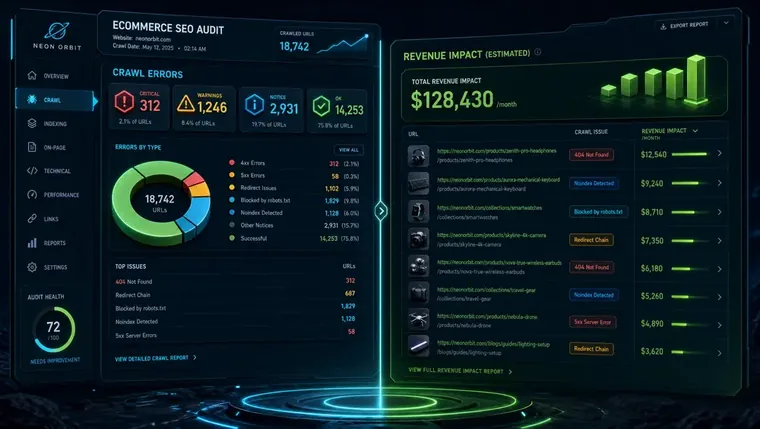
Last month we ran an ecommerce SEO audit across twelve home-services and home-goods stores. The pattern that emerged was striking: every store had a crawl report, and every crawl report was being worked through top-to-bottom — fixing meta description lengths before anyone had looked at whether filtered URLs were hemorrhaging crawl budget. Teams were spending two-week dev sprints on low-stakes tidy-ups while canonicalization errors on product variant pages quietly cannibalized their best category rankings. The lesson isn't that checklists are useless. It's that a checklist without a triage stack is just a to-do list dressed up as strategy. This post is the companion guide to our full SEO audit framework — zoomed in specifically on how ecommerce stores should sequence, prioritize, and act on what they find.
Why Does a Standard Audit Checklist Fail Ecommerce Stores?
A linear audit checklist treats all issues as equal priority, causing teams to burn dev resources on cosmetic fixes while revenue-critical canonicalization and crawl budget errors go unresolved.
The core problem is sequencing. A generic ecommerce SEO audit is structured around *categories* — technical, on-page, content, off-page — not around *revenue impact*. That framing made sense when stores had fifty product pages. It breaks down at five thousand.
Consider what's actually happening in a mid-size ecommerce catalog: faceted navigation generating tens of thousands of near-duplicate filtered URLs, product variant pages splitting link equity across colorway and size permutations, and out-of-stock pages accumulating thin-content signals for months before anyone notices. None of these issues show up as critical in a standard crawl report's severity scoring — but all of them can suppress your highest-value category pages more aggressively than a broken canonical tag on the homepage.
The fix isn't a better checklist. It's a triage protocol that stacks issues by two axes: estimated revenue drag (how much organic traffic or conversion rate is this likely suppressing?) and implementation effort (how many dev hours does a fix require?). High-impact, low-effort issues get resolved in sprint one. Everything else gets queued accordingly. Google Search Central documents many of these structural issues — but it won't tell you which one to fix first for your store. That judgment call is the actual value of a skilled audit.
Crawl tools rank issues by technical severity. Your business needs them ranked by revenue impact per dev hour. Those two orderings almost never match — and the gap between them is where most ecommerce audit projects lose months.
Which Platform Shapes What Your Audit Finds First?
Shopify, WooCommerce, and Magento each introduce different structural SEO risks that should dictate your audit starting point before any crawl tool runs.
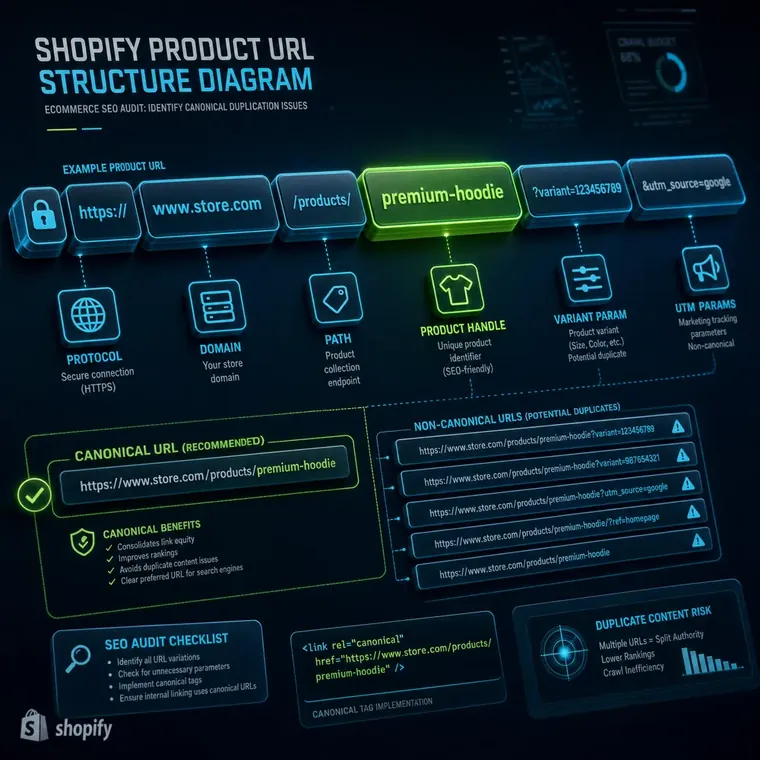
- Shopify: Forced URL Structures Shopify's `/collections/[handle]/products/[handle]` path creates duplicate product URLs by design — the same product is accessible via multiple collection paths. Without canonical tags pointing to the canonical `/products/` URL, Google indexes both, splitting equity. This is the single highest-frequency finding we see on Shopify stores and it's invisible to auditors using platform-agnostic checklists.
- WooCommerce: Taxonomy Sprawl WooCommerce's flexible taxonomy system lets store owners create product tags, categories, and attributes that all generate indexable archive pages. A 2,000-product store can quietly accumulate 8,000+ thin taxonomy URLs. The audit priority here isn't fixing each page — it's deciding which archives have search demand and noindexing the rest.
- Magento: Layered Navigation Defaults Magento's layered navigation generates parameter-based filtered URLs by default, and many installations haven't configured the URL parameter handling in Google Search Central or implemented proper canonical tags. This creates crawl budget black holes on large catalogs — crawlers spend budget on `/color=blue&size=M` pages instead of your money pages.
- All Platforms: Faceted Navigation Decision Framework Regardless of platform, faceted navigation requires an explicit decision per filter type: **noindex** filters with no search demand, **canonicalize** filters that represent legitimate landing page opportunities, and handle pure UX filters (sort order, page number) via URL parameters configured in Search Console. There is no universal answer — the right call depends on search volume data for each filter combination.
How Should You Handle Out-of-Stock and Discontinued Product Pages?
Out-of-stock pages should stay live with demand signals intact; discontinued pages need a 301 to the closest live equivalent only when the page has accrued meaningful backlinks or ranking history.
This is the gap that costs ecommerce stores the most accumulated equity over time, and none of the widely-cited audit frameworks address it with any precision. The out-of-stock vs. discontinued distinction matters enormously in an ecommerce SEO audit.
Out-of-stock products should almost always remain live. If the page ranks, has backlinks, or sits within an internal linking cluster, pulling it down or redirecting it discards ranking signals that took months to earn — for a stock status that may resolve in weeks. The right move is updating the page's content to surface alternatives, add a back-in-stock notification form, and strengthen the structured data to reflect current availability. Schema.org provides `ItemAvailability` properties specifically for this use case.
Discontinued products require a harder judgment. Check three signals before deciding: Does the page have referring domains? Does it appear in Google Search Console with impressions in the last 90 days? Does a direct successor product exist in the catalog? If the answer to any of those is yes, a 301 redirect to the closest live equivalent preserves the equity. If the page is orphaned, has no external links, and hasn't generated an impression in six months, a clean 410 (Gone) response is faster than a 301 chain and helps crawl budget more than it hurts.
For stores doing an audit as part of a platform migration, this decision tree needs to run *before* the migration — not after, when half the discontinued SKUs have already been 404'd by the new CMS. Our technical SEO audit services post covers migration-phase sequencing in more depth.
What Is the Right Sequence When Dev Resources Are Limited?
Sequence ecommerce SEO audit fixes by revenue drag divided by estimated dev hours — canonical and crawl budget issues almost always rise to sprint one regardless of catalog size.
Most ecommerce teams can't execute a full audit remediation simultaneously. A realistic sprint capacity of 20-40 hours means choices have to be made, and those choices compound over quarters. Here's the triage logic we apply after completing an ecommerce SEO audit:
Sprint 1 (highest revenue drag, lowest effort): Canonical tag errors on product variants, noindex directives on misconfigured category pages, and missing or malformed structured data for products — particularly `Product`, `Offer`, and `BreadcrumbList` schema from Schema.org. These fixes rarely require more than a few hours of dev time but have disproportionate ranking impact on core money pages.
Sprint 2 (high revenue drag, moderate effort): Faceted navigation decisions — determining which filtered URL patterns to noindex, which to canonicalize, and which to suppress via parameter handling. Running Screaming Frog integrated with the PageSpeed Insights API lets teams batch-audit Core Web Vitals scores across thousands of URLs simultaneously, making it possible to surface which specific category templates are dragging mobile LCP above the 2.5-second threshold without manually testing each URL.
Sprint 3 (moderate revenue drag, higher effort): Internal linking restructuring, content depth improvements on category pages, and international SEO issues like hreflang implementation if the store operates in multiple markets or currencies. Hreflang errors are systematically under-audited on ecommerce sites — currency-based URL parameters and geo-targeted subdomains create indexing ambiguity that suppresses performance in secondary markets without ever triggering a crawl error alert.
For teams thinking about the design layer alongside the SEO layer, our SEO website design resource covers how site architecture decisions during a build or redesign affect audit findings for years afterward. And the SEO audit checklist post outlines how to structure the hypothesis before the crawl even runs.

Backlinko's analysis of Alo Yoga's implementation is worth internalizing: variant URLs like `/airlift-intrigue-bra-steel-grey` carry a canonical pointing back to the master product URL. This isn't SEO paperwork — it's how you keep link equity consolidated on the page Google should rank. Use the free Detailed browser extension to spot-check canonical implementation across your variant URLs before you run a full crawl. If the canonicals are wrong, fix those before anything else.
Frequently Asked Questions
How long does an ecommerce SEO audit typically take for a Shopify store?
A focused ecommerce SEO audit on a Shopify store with 500–5,000 SKUs typically takes 5–10 business days to complete properly. The Shopify-specific issues — duplicate collection/product URL paths, canonicalization across variants, and app-injected scripts slowing Core Web Vitals — add meaningful scoping time that platform-agnostic audits underestimate. Larger catalogs with faceted navigation or multi-currency setups can push that to 3–4 weeks.
Should an ecommerce SEO audit cover paid and organic pages?
It should cover both. In ecommerce, paid and organic often share the same landing pages — category pages and product detail pages receive both Google Shopping and organic clicks. An ecommerce SEO audit that ignores page speed, structured data, and canonical health on paid landing pages leaves conversion rate problems unresolved regardless of ad spend. If you're running Performance Max campaigns, the landing page quality signals feed directly into Google's auction signals.
How do I choose between noindexing and canonicalizing filtered URLs?
The decision hinges on search demand. Run the filtered URL pattern (e.g., 'blue running shoes size 10') through a keyword research tool. If there's measurable search volume and the filter combination could serve as a legitimate landing page, canonicalize to it and build it out. If the filter has no meaningful search demand and exists only for UX navigation, noindex it or suppress it via URL parameter handling in Google Search Console. Never apply one rule universally across all filters on a site.
What's the most missed finding in a WooCommerce SEO audit?
Taxonomy archive sprawl. WooCommerce allows unlimited product tags and custom attributes, each of which generates an indexable archive page by default. A 1,500-product store can easily have 6,000+ thin archive pages that dilute crawl budget and create duplicate content signals. Most auditors flag this in passing but don't provide a decision framework for which archives to keep, which to noindex, and which to redirect into category pages with existing traffic.
How often should an ecommerce business run a full SEO audit?
Rather than scheduling audits on a calendar cadence, tie them to business events: a platform migration, a major catalog expansion (adding 20%+ new SKUs), a seasonal sale that creates temporary landing pages, or after any significant Core Web Vitals score change in Google Search Console. Treating the ecommerce SEO audit as a continuous triage process — with lightweight monthly monitoring and deeper reviews tied to events — is more effective than annual or quarterly full audits that generate reports nobody has time to act on.
Related reading
Ready to Run a Triage-First Ecommerce SEO Audit?
A crawl report without a priority stack is just noise. Our full SEO audit service starts with the revenue-impact triage layer — so the first sprint fixes what's actually suppressing your best pages, not what a tool flagged as a severity-three warning. Book a scoping call with Receipts Group and we'll map your highest-leverage fixes before any dev hours are committed.