
Call Center Scripting: Build Scripts Agents Graduate Beyond
Scripts don't fail because agents get the wrong words. They fail because agents never graduate beyond the words. Most call center scripting programs top out at a 200-line document that gets emailed to new hires and never touched again. Zendesk's own library runs 88 scenarios and counting. That's a governance nightmare disguised as a resource. The real problem is behavioral: over-scripted agents choke on deviations, customers hear the ceiling, and conversion rates plateau. We build scripts that function as a launchpad, not a leash. If you want the full ops picture, start with our call center training pillar. This post zooms in on the scripting layer specifically.
Why do most call center scripts make agents worse over time?
Over-scripted agents underperform on deviations. Scripts should be a floor agents graduate beyond, not a ceiling they stay under.
The data point nobody puts in their scripting guide: call handle time creeps up, not down, after about 90 days on a static script. We've watched this in our own ops. An agent who's read the same 14 turns a thousand times stops listening and starts skipping ahead. They miss the signal that this particular caller is three seconds from hanging up.
The SERP treats call center scripting as a content problem. More scripts, better scripts, 88 scripts organized by scenario. The fix is actually a behavioral architecture problem. You want agents internalizing *intent*. The reason behind each prompt. So when the call goes sideways, they're not frozen.
Whatfix describes scripts as tools to "graduate call center teams to scale," and that framing is the closest any major source gets to the right model. Scripts are scaffolding. You pull them away when the agent can stand on their own. The question isn't "does this script cover objection type 7?" It's "does this agent know why objection type 7 appears, and what outcome we're steering toward?"
What are the real failure modes of over-scripted agents?
Over-scripted agents produce robotic delivery, freeze on deviations, and frustrate callers who detect canned responses. All measurable in handle time and escalation rate.
- Robotic delivery on line 3 Agents who've said the same greeting 500 times flatten their prosody. Callers register it in under 4 seconds, and the trust cost is immediate.
- Script-deviation paralysis When a caller skips ahead, interrupts, or raises an off-script objection, over-scripted agents stall. They scan for the closest matching line rather than responding to the actual signal.
- Escalation as the default exit Agents who don't own the call's intent escalate anything ambiguous. Escalation rate is a direct proxy for script over-dependence.
- Canned-response detection Sophisticated callers. Especially in retention and collections. Recognize templated language. Once they hear it, they disengage or get defensive, and no script pivot recovers that.
Script cognitive load degrades agent performance after a break-in period. A 12-turn script outperforms a 40-turn script by week six for most agent profiles.
A 40-turn call center script becomes a liability after an agent's first six weeks. The cognitive load research is clear. Working memory under social pressure caps out around 7 chunks. Past that, agents start dropping context. A 12-turn script with strong intent notes beats a 40-turn script with full verbatim text on every performance metric we track past the break-in period.
How should you structure a call center script for high-stakes calls?
High-stakes calls. Retention, collections, escalations. Need intent-first scripting with explicit decision branches, not linear verbatim prompts.
There's a clean line between high-volume transactional calls and complex, high-stakes calls. Transactional: balance inquiry, appointment confirmation, order status. A tight linear script works fine there. Low variance, low emotion, low consequence if someone goes off-book. Complex: retention, collections, a caller who just got bad news. Linear scripts break immediately.
For high-stakes call center scripting, we use a three-layer structure. Layer one is intent anchors. One sentence per call phase that tells the agent what we're actually trying to accomplish, not just what to say. Layer two is decision branches. Explicit forks with no more than three options per node, each with a stated reason for the path. Layer three is floor lines. The minimum verbatim language required for legal or compliance purposes, flagged [REQUIRED] so agents know what can't move.
LeadSquared makes a genuinely useful distinction between genuine objections and delay tactics in their objection-handling scripts. It's one of the few tactical nuances in the major sources. We build that fork directly into layer two. Is this caller actually concerned about price, or are they buying time? The branch reads differently and closes differently. Check TCPA compliance (FCC) for the floor lines that aren't optional. Collections and outbound sales scripts carry hard regulatory exposure.

How do you build a script versioning and governance system?
Assign a script owner, set a review cadence tied to performance triggers, and version-control every draft so you can roll back after a bad A/B test.
- 1Assign a single script ownerOne person is accountable. Not a committee. The owner reviews QA data weekly and has authority to push a script update without a two-week approval chain.
- 2Define performance triggers for reviewSet explicit thresholds: escalation rate up 8% week-over-week, handle time up 15%, or a product/pricing change. Any trigger auto-schedules a script audit. This is how you avoid the 'we'll revisit it someday' failure mode.
- 3Version every draft in plain textStore scripts in version-controlled plain text. Not Google Docs with comment threads. We use a Git-adjacent workflow: each script has a changelog, a date stamp, and a tagged reason for the change. You need to be able to roll back after a bad A/B test.
- 4A/B test one variable at a timeChange one prompt in the script, run it against the control on a 50/50 call split for two weeks minimum, then score by resolution rate and escalation rate. Not impressions. Not talk time. Resolution and escalation. Those are the load-bearing metrics.
- 5Retire scripts on a fixed scheduleA script that's never retired becomes institutional calcite. Set a hard 90-day review cycle. If the script passes review, it gets a new date stamp. If it doesn't, it gets archived. Not deleted, archived. So you can pull historical comparisons.
How does scripting plug into your dialer and CRM stack?
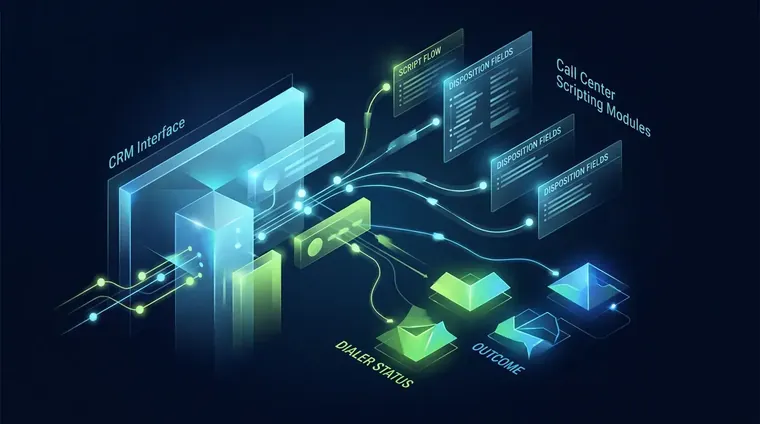
Scripts embedded directly in your CRM and dialer. Not in a separate PDF. Cut agent lookup time and feed real-time disposition data back into the governance loop.
A script living in a PDF on a shared drive is already broken. Agents alt-tab, lose their place, and fill the gap with whatever comes to mind. Scripts need to live inside the tools agents are already looking at. Your CRM and your dialer. HubSpot CRM documentation covers call disposition fields natively. Map those to your script's decision branches and you get real data on which branch gets used and which one gets skipped.
For dialer integration, Five9 documentation and Twilio Voice Programmable both support dynamic scripting panels. They surface the right script block based on call type and queue. That's the setup we push. Not one monolithic script, but a modular system where the dialer pulls the right module. Pair it with Zapier integration directory automations that fire CRM updates on disposition tags, and the governance data flows without anyone touching it manually.
For the automation layer above the script. Routing logic, lead scoring, follow-up sequences. Our marketing automation agency work covers that in detail. If you're setting up the dialer itself, predictive dialer setup is the companion post.
How fast should a scripting program ship new content?
One article per day from a 70+-deep queue with Ahrefs research baked in per row. Every page passing a 25-gate audit before publish. Is the velocity benchmark we hold.
Script-as-document vs. Script-as-system: what's the real difference?
A document script is static, unversioned, and ungoverned. A system script is modular, CRM-embedded, and tied to measurable performance triggers.
| Feature | Script as Document | Script as System |
|---|---|---|
| Storage | PDF or Google Doc, shared via email | CRM-embedded, dialer-surfaced modules |
| Versioning | None — overwritten or ignored | Version-controlled with date stamps and changelogs |
| Update trigger | Whenever someone remembers | Hard-threshold performance triggers (escalation rate, handle time) |
| Agent behavior goal | Read the script correctly | Internalize intent, graduate beyond verbatim |
| Measurement | Not measured | A/B tested, resolution rate and escalation rate as primary KPIs |
Call center scripting improvements plateau when the lead quality or routing logic feeding the call is broken. Fix upstream before optimizing the script.
We've burned time polishing scripts on campaigns where the real problem was bad lead quality hitting the wrong queue. One Hacker News commenter put it plainly: "they very much killed the golden goose". Meaning that papering over a broken system with better scripts just dresses up the same underlying failure. Scripts are the last mile. If the routing, the lead source, or the offer is wrong, the best call center scripting framework in the world won't save your conversion rate. Fix upstream first.
Frequently Asked Questions
How long should a call center script be for outbound sales calls?
For outbound sales in most industries, 10-14 turns is the practical ceiling before cognitive load starts hurting agent performance. Past that point, agents start skipping ahead or improvising in ways you can't track. We typically build a core script of 10-12 turns with a separate objection branch deck. Not a single long document. And train agents on intent so they can fill gaps without going off-brand.
How do you A/B test a call center script without confounding variables?
Change exactly one variable per test. One prompt, one objection response, one closing line. Split your call queue 50/50 between the control and variant for a minimum of two weeks, then score by resolution rate and escalation rate. Talk time is a secondary signal. Never run two script changes simultaneously; you won't be able to isolate what moved the number.
Who should own the call center scripting governance process?
One named person. Not a committee. The script owner reviews QA data weekly, holds authority to push updates without a multi-week approval chain, and is accountable for both performance metrics and compliance exposure. In smaller call center operations, this is often the QA lead. In larger ops, it should be a dedicated role with a direct line to both the operations manager and the compliance team.
When should a call center agent abandon the script entirely?
Emotionally escalated calls are the clearest signal. When a caller is in distress, angry past a certain threshold, or the call has gone genuinely off-script for more than two turns, the agent should drop to intent-layer language rather than hunting for the nearest matching script line. We train agents to recognize three 'abandon' triggers: sustained elevated emotion, a factual situation the script doesn't cover, and explicit caller hostility toward scripted responses.
How does call center scripting differ for inbound versus outbound calls?
Inbound scripts are primarily reactive. They need strong triage logic and a fast path to resolution. Outbound scripts are primarily persuasion architectures. They need a strong opener, a tight value statement, and an objection branch deck. The failure modes are opposite: inbound over-scripting causes long handle times and escalations; outbound over-scripting causes robotic openers and early hang-ups. We build them as completely separate script systems with a shared compliance layer.
Related reading
Build scripts that agents graduate beyond
Call center scripting done right is an ops decision, not a copy problem. If you want to see how scripting fits into a full call center training program, the call center training pillar is where to start. If you're ready to build the system. Versioning, governance, CRM integration, and all. Book a call and we'll show you the receipts.