
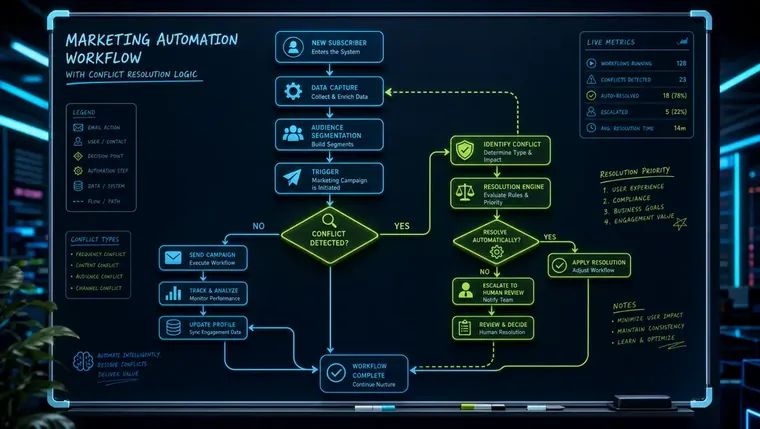
Marketing Automation Workflow: Build the Conflict-Resolution Layer First
A marketing automation workflow fails not because individual sequences are poorly written, but because no one decided what happens when a single contact qualifies for three of them at once. That missing piece — a conflict-resolution layer — is what separates automation that compounds revenue from automation that erodes trust and inflates unsubscribe rates. If you're evaluating vendors or rebuilding your stack, our marketing automation agency overview maps how this fits into a full infrastructure build.
Most operators treat their workflow library as a collection of independent recipes: build a welcome series, bolt on a cart abandonment sequence, add a re-engagement campaign, repeat. What they skip is the governance logic that decides which workflow wins, which pauses, and which disenrolls when the same contact meets the criteria for all three on the same Tuesday morning. That omission is where automated chaos lives.
What is a marketing automation workflow — really?
A marketing automation workflow is a rule-governed sequence of actions triggered by contact behavior, with a priority layer that resolves conflicts when a contact qualifies for multiple flows simultaneously.
Strip away the vendor marketing and a marketing automation workflow is three things: a trigger (what starts it), a set of branching conditions (what path a contact takes), and an exit condition (what ends it). The problem is that most teams define the exit condition as 'contact completes the sequence' or 'contact converts' — and completely omit the scenario where the contact also meets the trigger for two other active workflows mid-sequence.
The HubSpot CRM documentation models contacts as objects with properties that multiple workflows can read and write simultaneously. That's powerful, but it also means Workflow A can update a contact property that accidentally re-triggers Workflow B's enrollment condition — creating a loop that no individual sequence owner ever intended. Understanding the object model is step one to understanding why conflicts aren't an edge case; they're the default state of a mature workflow library.
For B2B teams especially, the complexity compounds. Unlike ecommerce scenarios where a single contact = a single buyer, B2B workflows often need account-level enrollment logic — where one stakeholder downloading a whitepaper should trigger a sequence, but the sequence should pause if another stakeholder at the same company is already in active sales follow-up. Contact-level automation applied to account-level sales cycles is one of the most common and least-discussed failure modes in the space.
The four workflow failure modes operators actually hit
The most common marketing automation workflow failures are duplicate enrollments, trigger misfires, suppression list gaps, and time-zone send errors — not poor copywriting.
- Duplicate enrollment A contact re-enters a workflow because an exit condition wasn't set or a property was reset by another workflow. Result: they receive the same onboarding or nurture sequence twice, eroding trust immediately.
- Trigger misfires A workflow fires on a loosely defined trigger — 'any form submission' instead of 'demo request form' — pulling in contacts who shouldn't be in that sequence and distorting conversion data downstream.
- Suppression list gaps Active customers enrolled in acquisition workflows, or churned contacts receiving upsell sequences, because suppression lists weren't applied at the workflow level and aren't updated in real time.
- Time-zone send errors Delay steps calculated in absolute hours (not contact local time) send emails at 3 AM or bundle sends into the same hour when daylight saving time shifts — both measurable killers of open rates.
Assign every workflow a priority tier (acquisition, nurture, retention, reactivation) and enforce a rule: a contact in an active Tier 1 acquisition flow cannot simultaneously be enrolled in Tier 3 reactivation. When the higher-priority workflow exits, the system re-evaluates eligibility for lower-priority flows — not before. This single rule eliminates the majority of message-collision complaints and deliverability damage.

How do you set workflow fatigue thresholds?
Cap each contact at two to three concurrent active workflows and enforce a contact-level frequency cap of no more than one automated touchpoint per day across all sequences.
Workflow fatigue is a measurable phenomenon that virtually no automation guide addresses directly. Sender's research shows optimized welcome sequences achieve 68.6% open rates over a 3-5 email series — but that performance assumes the contact isn't also receiving cart abandonment emails, a product education drip, and a re-engagement push simultaneously. Stack four active workflows on one contact and you're not increasing touchpoints; you're accelerating unsubscribes.
The practical fix is a contact-level frequency cap enforced at the platform level, not the individual workflow level. Set a maximum of one automated touchpoint per day per contact, across all workflows. Then layer on a concurrent enrollment cap — most teams perform well with a hard limit of two active workflows per contact at any time. When a third workflow tries to enroll a contact who's already at the cap, it queues the enrollment for after the earliest active workflow exits.
For teams running predictive dialer sequences alongside email workflows, the same logic applies to phone touchpoints — and TCPA compliance (FCC) regulations make frequency governance a legal requirement, not just a best practice. Calls made via Twilio Voice Programmable or Five9 platforms can be rate-limited at the API level, giving you a programmatic enforcement point for contact-level caps that spans both voice and email channels.
When should a workflow hand off to a human?
A marketing automation workflow should disenroll a contact and flag them for human follow-up when they hit a lead score threshold, request direct contact, or exhibit high-intent behavior that automated sequences can't address with precision.
The handoff logic between a marketing automation workflow and a sales rep is the most consequential — and most poorly documented — decision in the entire system. Most teams define the handoff as a lead score threshold, which is a reasonable starting point but misses several signals that score alone won't capture: a contact who replies to an automated email, a contact who visits the pricing page three times in 48 hours without converting, or a B2B contact at a target account whose colleague is already in active deal stages in the CRM.
The cleaner model is a three-condition disenrollment trigger: (1) lead score exceeds the sales-qualified threshold, OR (2) contact takes a direct-contact action (reply, live chat, demo request), OR (3) account-level CRM status changes to 'Active Opportunity.' Any one condition disenrolls the contact from all active nurture workflows and creates a CRM task for the assigned rep — with a 48-hour fallback that re-enrolls the contact into a lower-cadence sequence if the rep takes no action.
This architecture keeps automation from continuing to message contacts who are mid-conversation with a salesperson — a collision that consistently damages deal velocity and, per teams we've worked with, is a leading cause of sales blaming marketing automation for 'burning leads.' If your CRM isn't structured to support this logic, CRM implementation services should come before workflow architecture, not after. For enterprise-scale builds, see also what enterprise marketing automation actually costs in 2026 before committing to a platform.
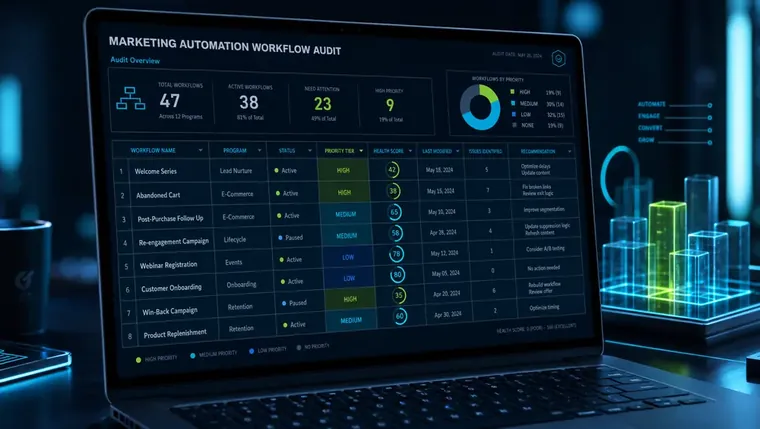
How to audit an existing marketing automation workflow library
Auditing a marketing automation workflow library takes four steps: map all active enrollments per contact, identify overlapping triggers, enforce priority tiers, and set disenrollment conditions on every active workflow.
- 1Pull concurrent enrollment dataExport a contact-level report showing how many active workflows each contact is currently enrolled in. Any contact in more than two active workflows is a red flag. Most platforms support this via the Zapier integration directory or native reporting — use whichever gives you a full enrollment snapshot.
- 2Map every trigger for conflictsList every workflow's enrollment trigger in a shared doc. Look for overlapping trigger conditions — two workflows that fire on 'any page visit' or 'any form fill' are almost certainly enrolling the same contacts simultaneously. Tighten triggers to the most specific qualifying condition available.
- 3Assign priority tiers and write the rulesRank every active workflow by business priority: acquisition > sales-assist > nurture > retention > reactivation. Document the rule explicitly: contacts in a higher-tier workflow cannot enroll in a lower-tier workflow until they exit. Enforce this with suppression lists or workflow suppression settings at the platform level.
- 4Add or update disenrollment conditionsEvery workflow should have at least three exit conditions: goal met, contact took a disqualifying action, and time-based expiry (maximum duration). If any workflow has no exit condition beyond 'sequence completes,' add one before the audit closes.
B2B marketing automation workflows must operate at the account level, not just the contact level, to avoid messaging conflicts across multiple stakeholders in the same deal.
Everything in this guide applies at the account level for B2B teams. If two contacts at the same company are enrolled in different workflow tiers — one in a nurture sequence, one with an active sales rep — the system needs account-level suppression logic to prevent crossed signals. Most off-the-shelf platforms default to contact-level logic. Building account-level enrollment requires either a CRM that natively supports account objects (see Salesforce Trailhead for their account hierarchy model) or a custom suppression layer built on top of contact-level tooling.
Frequently Asked Questions
How many workflows should a contact be enrolled in at once?
Most teams see engagement drop sharply beyond two concurrent active workflows per contact. The best practice is to set a hard enrollment cap of two workflows at any given time and queue additional enrollments until a higher-priority flow exits. This applies across all channels — email, SMS, and voice sequences all count toward the cap.
What causes duplicate enrollments in a marketing automation workflow?
Duplicate enrollments in a marketing automation workflow are almost always caused by one of two things: a missing or misconfigured exit condition that allows re-enrollment, or a second workflow writing a contact property that resets the enrollment trigger for the first. Auditing every workflow's entry AND exit conditions together — not separately — is the fastest way to catch this in systems like HubSpot or Salesforce.
When should a marketing automation workflow hand off a lead to sales?
A workflow should disenroll a contact and create a CRM task for sales when any one of three conditions is met: the contact's lead score crosses your sales-qualified threshold, the contact takes a direct-contact action (reply, demo request, live chat), or a colleague at the same account enters an active deal stage. All three conditions should trigger immediate disenrollment — not a delayed notification.
How is B2B marketing automation workflow architecture different from ecommerce?
Ecommerce workflows are almost always contact-level: one buyer, one set of triggers. B2B workflows need account-level logic because multiple contacts at the same company may be at different stages simultaneously. Enrollment decisions need to account for what's happening at the account level — not just the contact — to avoid sending a cold nurture email to a contact whose colleague is in active contract negotiation.
How do I know if my marketing automation workflow library needs an audit?
Three signals indicate your workflow library needs an audit: unsubscribe rates rising without a clear campaign cause, sales reps reporting that prospects mention 'too many emails,' or your contact database showing contacts enrolled in more than two active workflows simultaneously. Any one of these is enough to start with a concurrent enrollment export and a trigger-conflict map before building anything new.
Related reading
Ready to build workflows that don't conflict?
If your team is stacking sequences without a conflict-resolution layer, the problem compounds with every new workflow you add. Our marketing automation agency team builds the governance architecture first — priority tiers, disenrollment logic, frequency caps, and CRM handoff rules — before a single sequence goes live. Talk to us about your workflow stack and we'll map the gaps before they cost you contacts.