CRM vs Marketing Automation: The Real Ops Decision
74% of MQLs handed from a marketing automation tool to a CRM are never acted on by sales. Not because reps are lazy. Because the scoring model was wrong from day one. That's the number nobody in the crm vs marketing automation debate wants to lead with. Every comparison article tells you to buy both and integrate them. What we've seen running sales infrastructure for operators past $5M is that the integration becomes the bottleneck. Before you spend $800/month stacking tools, read our full breakdown on the marketing automation agency page.
Why Does the MQL Handoff Actually Fail?
MQL handoffs fail because lead scoring is calibrated on engagement data, not buying intent. So sales reps stop trusting the queue entirely.
Here's what the clean diagrams don't show. A contact opens three emails, clicks a pricing page, and hits your lead score threshold. Marketing automation fires the handoff. The record lands in the CRM. The sales rep opens it, sees a job title that doesn't match their ICP, and buries it. Three weeks later, marketing reports a 60% MQL acceptance rate. Sales says the leads are bad. Both are right.
The scoring model was built on behavioral signals. Opens, clicks, page visits. Not on signals that predict whether this person can actually buy. HubSpot CRM documentation makes clear that contact properties live in the CRM layer; behavioral engagement lives in the MAP layer. When those two layers don't share a unified contact ID, you get duplicate records, stale scores, and a queue nobody trusts.
We've seen this exact pattern with operators in home services and B2B SaaS alike. The fix isn't a better integration. It's rebuilding the scoring model around signals that sales reps already act on. Inbound call intent, pricing page depth, demo requests. Not vanity engagement metrics.
Zapier charges by task volume. A mid-size operation pushing 5,000 contacts a month through a CRM-to-MAP sync can burn $299–$599/month in Zap tasks alone. That's before you pay anyone to fix broken field mappings. That's the CRM vs marketing automation integration tax. Check Zapier's integration directory. CRM-to-MAP recipes are the most-cloned automations on the platform for a reason. Everyone needs them. Everyone underestimates the upkeep.
At What Stage Does Buying Both Tools Actually Make Sense?
Below $3M ARR and 2 sales reps, a single platform with CRM and automation bundled is almost always cheaper and operationally simpler than two separate tools.
This is the question no comparison article will answer with a number. We will.
If your sales cycle is under 14 days, lead scoring adds almost no value. By the time a score moves from your MAP to your CRM, the rep should have already called. Fewer than 3 full-time salespeople means the queue volume isn't there to justify a dedicated scoring model. Below $3M ARR, the operational overhead of running a two-tool stack eats the gains. Field mapping audits, deduplication runs, sync lag debugging. The time cost runs higher than any lift the MAP delivers.
Above $5M ARR, with a 30-plus-day sales cycle and a dedicated marketing ops person, the math flips. Volume earns the complexity. A MAP running behavioral nurture sequences while the CRM tracks deal stages actually saves reps time at scale. Salesforce Trailhead has a solid module on this exact threshold. Where pipeline velocity justifies dedicated automation tooling separate from the CRM.
The honest part: for Safeguard Impact, we ran a single HubSpot instance instead of stacking a separate MAP on top. Simpler to instrument. Easier to audit. It wasn't the enterprise-grade setup. It was the right call for where they were.
CRM vs Marketing Automation: The Honest Side-by-Side
CRM owns deal-stage and contact history; marketing automation owns behavioral sequences. But modern platforms bundle both, making the split a staging question, not a permanent architecture.
| Feature | CRM | Marketing Automation |
|---|---|---|
| Primary job | Track deals, contacts, and pipeline stages | Run behavioral sequences and lead nurture |
| Who uses it daily | Sales reps, SDRs, account managers | Marketing ops, demand gen, content teams |
| Contact identity model | One record per contact/account | Often cookie-based or email-based — can split identities |
| Scoring & intent signals | Manual pipeline stage, rep-set priority | Behavioral scoring (opens, clicks, page depth) |
| Integration risk | Source of truth — duplicates destroy pipeline reporting | Sync lag creates stale scores and ghost contacts |
| Best solo (no other tool) | Under $3M ARR, short sales cycles, direct outreach | High-volume email-only nurture, no SDR team |
What Actually Breaks When You Run Two Separate Tools
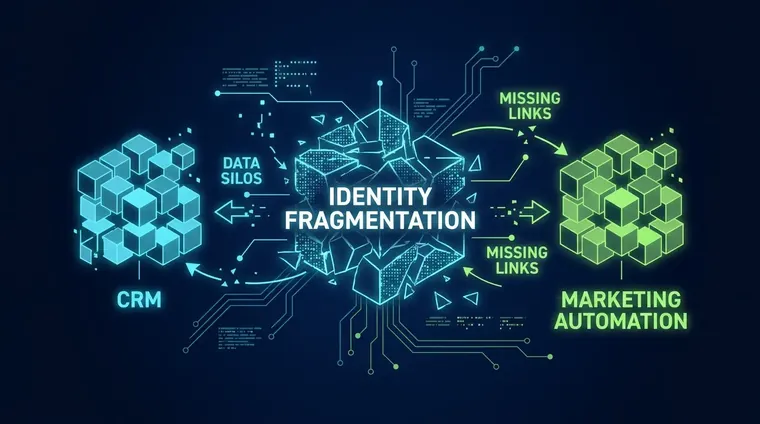
The four most common failure modes are duplicate records, sync lag, field mapping drift, and score decay. None of which appear in vendor integration demos.
- Duplicate Contact Records A prospect fills a form with 'john@company.com' in the MAP and is manually entered as 'john.smith@company.com' in the CRM. Both records score, both get worked. Neither is the full picture.
- Sync Lag and Stale Scores MAP-to-CRM syncs often run every 15–60 minutes. A prospect who books a demo at 9:02am might not appear in the CRM queue until 9:47am. By then, they've moved on.
- Field Mapping Drift Someone adds a custom property in the CRM. Nobody updates the MAP field map. Six months later, 40% of your contacts have a blank 'Industry' field and your segmentation is broken.
- Score Decay Nobody Monitors Lead scores inflate over time unless you build explicit decay rules. Most teams don't. The queue fills with 18-month-old contacts who downloaded a whitepaper and never bought.
- TCPA Compliance Gaps Consent captured in the MAP doesn't always propagate cleanly to the CRM's outbound call queue. Running a predictive dialer without synced opt-in data is an FCC exposure. See TCPA compliance guidance from the FCC before you build the handoff.
A 30-minute ops audit catches integration architecture mistakes before they become six-month cleanup projects.
We run a 30-minute stack audit before we recommend any tool. If you're staring at crm vs marketing automation and you can't tell which one is the actual bottleneck, book a call with us before you burn another month on a sync that won't hold.
When Modern All-in-One Platforms Make the Debate Obsolete
HubSpot's bundled CRM and MAP, and Salesforce Marketing Cloud's native connector, have collapsed the crm vs marketing automation boundary for most SMBs. Making a two-tool stack a premium choice, not a default.
The crm vs marketing automation split made sense in 2015. HubSpot has since bundled CRM, email automation, sequences, and behavioral scoring into one contact record. Salesforce's Marketing Cloud sits on the same identity layer as Sales Cloud. The two-tool model is now a choice. Not a default.
For operators under $5M ARR, the bundled approach wins on simplicity every time. One contact record. One scoring model. No sync tax. The only reason to split them is if you need capabilities the bundled tool can't match. Usually high-volume SMS/voice workflows. Which is where something like Twilio Programmable Voice earns its place outside the CRM stack.
100/100 desktop PageSpeed on Safeguard Impact. Verified by Google's own PageSpeed Insights, not our scoring. That's the kind of receipt we bring to every infrastructure decision. The same standard applies to stack architecture. If a two-tool setup can't show better pipeline conversion than a single platform, the complexity isn't justified.
For deeper context on how we build automation sequences that actually close, see our marketing automation workflow guide and the marketing automation consultant breakdown.

A Decision Framework That Actually Commits to a Threshold
If your average sales cycle is under 14 days and your team has fewer than 3 reps, a single bundled CRM is the right call. A separate MAP will add cost without changing rep behavior.
Hot take: most businesses buying a dedicated marketing automation platform are buying complexity they haven't earned yet. The decision runs through three gates, in order.
Gate 1. Sales cycle length. If the average time from first touch to close is under 14 days, behavioral scoring won't influence rep actions in time to matter. Use CRM sequences and skip the MAP.
Gate 2. Rep headcount. Fewer than 3 full-time reps means your queue is small enough to manage by hand. The overhead of running a MAP exceeds the benefit. See also our predictive dialer setup guide for what high-volume outbound looks like when it does make sense to add a dedicated dialer layer.
Gate 3. Marketing ops capacity. A MAP without a dedicated ops owner becomes a graveyard of misconfigured sequences. If nobody on your team has 10+ hours a week to own it, the tool will actively hurt you. Stale automations fire at the wrong contacts at the wrong time. Enterprise-level costs and configurations are worth reading before you sign an annual contract.
Pass all three gates? A dedicated MAP alongside your CRM is the right call. Fail any one of them? Start with a bundled platform and put the saved budget into content and paid acquisition instead.
Frequently Asked Questions
What's the real difference between a CRM and marketing automation?
For most small businesses in 2026, the difference is mostly academic. Platforms like HubSpot bundle both into one contact record. The practical question isn't CRM vs marketing automation; it's whether your sales cycle is long enough (30+ days) and your team large enough (3+ reps) to justify the complexity and cost of running two separate tools with a sync between them.
Does crm vs marketing automation matter if I'm under $3M ARR?
Under $3M ARR, a separate marketing automation tool almost always creates more overhead than value. The Zapier sync tax, duplicate records, and field mapping drift eat up time that's better spent on outreach. A single bundled CRM with built-in sequences handles 90% of what a separate MAP would do. Without the integration risk.
How do I know if my CRM and marketing automation sync is actually broken?
Three fast signals: your sales reps aren't working the MQL queue (they don't trust it), your contact count in the MAP is higher than in the CRM (duplicates), or deals are closing that never scored as MQLs (the scoring model doesn't reflect real buying intent). If any of those are true, the integration is broken before you even check the field mappings.
Related reading
Free guides on this, step by step:
Ready to Stop Guessing on Stack Architecture?
The crm vs marketing automation question has an answer. It just depends on your sales cycle, your headcount, and whether your current sync is actually holding. We audit stacks, fix the data layer, and build automation that sales reps trust. Start with our marketing automation agency page or book a 30-minute audit call directly. We bring the receipts.