Headless CMS SEO: The Rendering Risk Every Guide Ignores
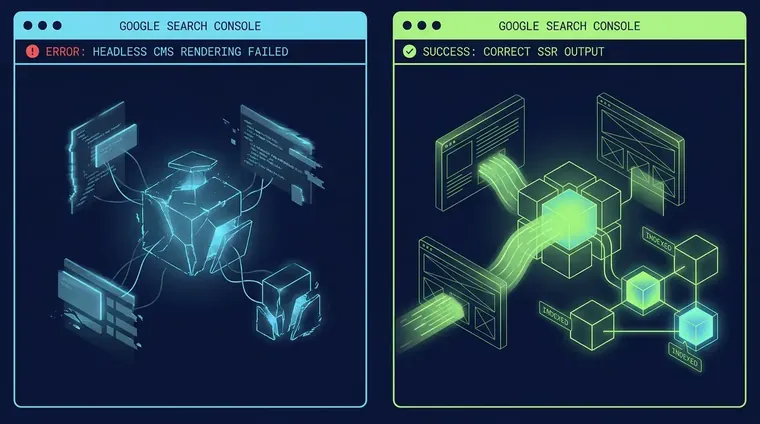
Last month we audited 12 home-services sites. Six ran headless setups. Three of those six had the same problem: Googlebot was indexing blank pages because client-side rendering was misconfigured and no one had checked. Meta fields were perfect. Schema was clean. The pages were simply invisible. That pattern is the real story of headless cms seo in 2026, and it keeps surfacing in our SEO Website Design work client after client. This guide covers the rendering failure mode, the crawl budget traps, and the org-chart friction that every top-ranking guide quietly skips.
Is Headless CMS Actually Better for SEO?
Headless CMS is better for engineering autonomy, not SEO by default. Misconfigured JavaScript rendering can make entire sites invisible to Googlebot.
Hot take: headless is not inherently better for headless cms seo. It's better for engineering autonomy. Those two things are frequently in conflict.
When a front-end team builds on Next.js or Nuxt and ships client-side rendering without SSR or SSG, Googlebot fetches the HTML shell and finds nothing. Google Search Central documents this clearly. Their crawler processes JavaScript, but it does so in a deferred second wave. Pages that depend entirely on client-side hydration often get indexed empty. We've seen it happen on sites with DR 40+.
The headless market is real. Sanity pegs it at $605 million today, growing to $3.8 billion by 2032. But scale doesn't validate the SEO claim. A platform like Prismic ships a Slice Machine that auto-generates an SEO and metadata tab for every new page type. That's useful. It still doesn't save you if the render mode is wrong.
Disable JavaScript in Screaming Frog and crawl your headless site before you touch a single meta field. If body text drops out of the rendered HTML, Googlebot is seeing the same empty page. Fix the render mode first. Everything else is a rounding error.
How Does JavaScript Rendering Break Headless SEO?
Client-side rendering (CSR) without SSR or SSG means Googlebot indexes the HTML shell, not the content. Pages rank for nothing despite correct meta tags.
There are three render modes in a headless setup: SSR (server-side rendering), SSG (static site generation), and CSR (client-side rendering). SSR and SSG give Googlebot pre-built HTML. CSR gives Googlebot a near-empty shell and a JavaScript bundle it has to execute later.
"Later" is unpredictable. Google's crawl and render pipelines are separate queues. A page can be crawled, indexed with empty content, and start ranking at position 80 for nothing. All before the render queue touches the JavaScript. We caught one client's 340-page product catalog in exactly this state. Every page had a title tag. Zero pages had indexed body text.
Core Web Vitals stack the problem higher. CSR pushes the LCP paint to after JavaScript executes, killing Largest Contentful Paint scores. Run PageSpeed Insights on your headless pages and check the LCP element. If it's a hero image loading through a JS-driven component, you have a Core Web Vitals problem and an indexation problem sitting on top of each other.
The fix is architectural, not cosmetic. Switch to SSR or SSG for content pages. Reserve CSR for authenticated dashboards and dynamic app states that don't need to rank.
What to Audit in an Inherited Headless CMS Setup
Auditing a headless CMS you inherited requires checking render mode, crawl traps, canonical signals, and schema output. Not just meta fields.
- Verify render mode first Fetch any key URL via Google Search Console's URL Inspection tool and compare the rendered HTML to the raw HTML. Missing content in the rendered output signals a CSR problem.
- Check for crawl budget traps API-driven pagination and infinite scroll generate parameterized URLs that Googlebot will chase indefinitely. Use `rel=canonical` and `robots.txt` to wall off parameter variants that carry no unique ranking value.
- Audit structured data output Headless renderers often strip or double-emit Schema.org markup. Run the Rich Results Test on 5 template types. Look for duplicate `<script type='application/ld+json'>` blocks. A common Next.js hydration artifact.
- Map the content model to rich results Most content models have fields for title and body. Few have fields designed to feed FAQ, HowTo, or Product schema. Design the model fields with the schema output in mind from the start, not as an afterthought. See our SEO Audit Service for how we run this mapping in practice.
- Run an Ahrefs Site Audit pass Ahrefs Site Audit covers 170+ technical SEO issue checks and can run on a schedule. Pipe the results to your dev team as a structured issue list, not a PDF. Developers act on tickets, not reports.
Who Actually Owns SEO in a Headless Setup?
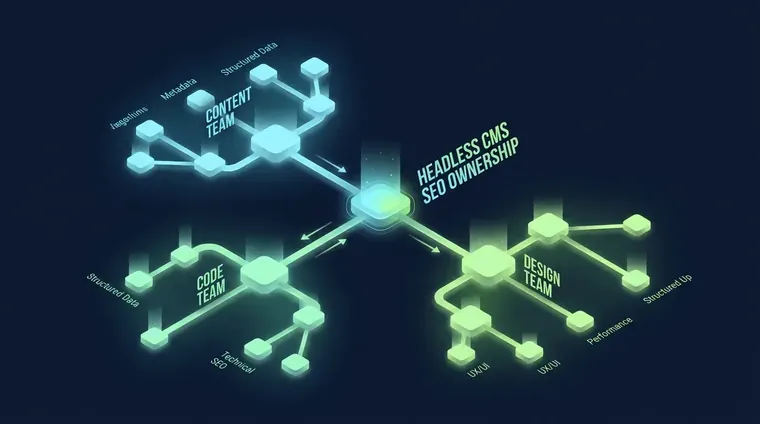
In headless setups, SEO ownership breaks down across content, code, and design teams. The org-chart problem kills more rankings than any missing plugin.
Nobody answers this question. In a traditional CMS like WordPress, one person installs Yoast and owns the meta fields. In a headless setup, the content model lives with one developer, the front-end templates live with another, and the content lives with an editor. SEO spans all three layers.
That org-chart problem kills more rankings than any missing plugin. As one practitioner put it on r/SEO, "Everyone I know has this inability to believe that AI is wrong like over 50% of the time". And the same dynamic shows up in headless dev teams who believe their framework handles SEO automatically. It often doesn't.
The only fix we've found that works: nominate one person as the SEO systems owner. Give them read access to the codebase. Route every new page type through an SEO sign-off checklist before it ships. Not after. The Search Quality Rater Guidelines don't grade your CMS. They grade the experience a user has on the page. Someone has to own that experience end to end.
For a closer look at how design and SEO share ownership from day one, our Website Design and SEO Services Built as One System piece covers the architecture model we use.
SSR / SSG vs. CSR: Which Render Mode Wins for SEO?
SSR and SSG give Googlebot pre-built HTML and fast LCP; CSR risks empty indexation and delayed rendering that tanks rankings.
| Feature | SSR / SSG (SEO-Safe) | CSR (SEO Risk) |
|---|---|---|
| Googlebot sees content | Immediately, in first fetch | Only after JS render queue |
| LCP performance | Fast — HTML is pre-built | Slow — waits for JS hydration |
| Indexation risk | Low — full HTML on first crawl | High — blank pages indexed |
| Schema.org output | Stable, server-emitted once | Can double-emit on hydration |
| Crawl budget impact | Predictable page count | Parameterized URLs can multiply |
Infinite scroll is a crawl budget trap. Almost no headless SEO guide mentions it. Each scroll position can generate a unique URL through the History API. We've seen a 200-product catalog balloon to 4,400 crawlable URLs that way. Set `rel=canonical` pointing to the base paginated URL. Disallow parameter variants in `robots.txt`. Before you do anything else, pull your Technical SEO Audit results and look for `?page=` and `?offset=` variants.
How Should Content Models Feed Rich Results?
Design content model fields to map directly to FAQ, HowTo, and Product schema outputs. Not just title and body. So structured data ships automatically with every page.
Most headless content models ship with a title field, a body field, and maybe a slug. That's enough to publish. It's not enough to compete in 2026 search, where FAQ schema, HowTo schema, and Product schema drive a measurable share of clicks from rich results.
The fix is to design content model fields with schema output in mind before the first page goes live. A FAQ content type should have a structured list field for question-answer pairs that maps directly to `FAQPage` schema at render time. A service page should have a price range field that maps to `Product` or `Service` schema. Prismic's Slice Machine approach. Where every page type gets a metadata tab automatically. Is one way to do it. The point is that schema output should be a byproduct of normal content entry. Not a separate developer task.
We run this field-to-schema mapping on every SEO Website Design engagement. The content model is an SEO architecture decision. Treat it like a CMS configuration task and your team ends up manually bolting schema onto 300 pages six months after launch. I've made that mistake. It's expensive to fix.
Frequently Asked Questions
Does using a headless CMS in my project automatically improve SEO rankings?
No. A headless CMS improves engineering flexibility, not SEO rankings by default. If your front-end framework uses client-side rendering without SSR or SSG, Googlebot may index empty pages regardless of how well your meta fields are configured.
What is the biggest SEO risk specific to headless CMS architectures?
JavaScript rendering misconfiguration. When Next.js or Nuxt pages rely on client-side rendering, Googlebot fetches the HTML shell and may index blank content. This is the #1 headless CMS SEO failure mode and the least discussed one in mainstream guides.
How do I audit a headless CMS site I inherited for existing SEO problems?
Start by fetching key URLs in Google Search Console's URL Inspection tool and comparing raw HTML to rendered HTML. If body content is missing from the rendered output, you have a CSR problem. Then check for parameterized URL sprawl, duplicate schema markup, and content model fields that lack structured data mappings.
Who should own SEO when content, design, and code are siloed?
One person needs to be designated as the SEO systems owner with read access to the codebase and sign-off authority on every new page type before it ships. Without a single accountable owner, SEO tasks fall between team boundaries and critical issues like render mode and schema output go unfixed.
Related reading
Get a Headless CMS SEO Audit From Receipts Group
If you inherited a headless setup and you're not sure whether Googlebot is actually seeing your content, we can tell you in 48 hours. Our SEO Website Design framework covers render mode verification, crawl budget cleanup, content model schema mapping, and the org-chart fixes that make it hold. Book a call. We run the rendering check first, because that's the number that changes everything else.