

The On-Page SEO Checklist That Starts With Triage
Last month we audited 12 home-services sites. Every single one had keyword-stuffed title tags, duplicate meta descriptions, and H1s that matched their title tags character-for-character. Every one was already doing the standard on page seo checklist. And every one was still stagnant. The pattern that emerged: they'd checked every box on the list and still couldn't diagnose *why* the page wasn't moving. That's the problem with how most checklists are written — they hand you tasks without a decision tree. Our full SEO audit framework treats the checklist as the *second* step. Triage comes first.
Why does every on-page SEO checklist fail the same way?
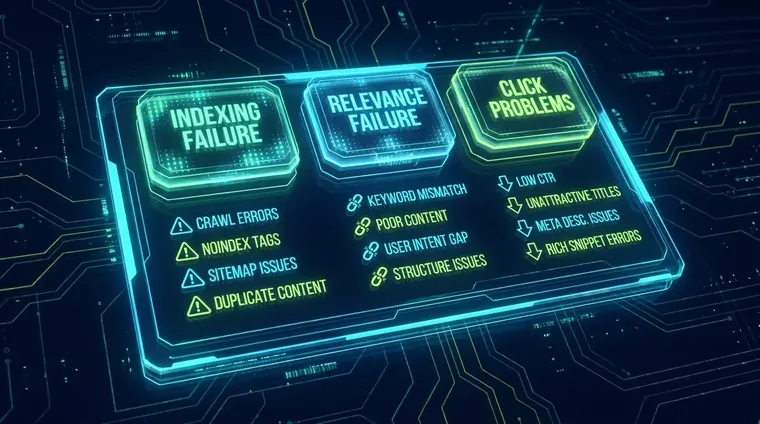
Most checklists list tasks without telling you which failure mode — indexing, relevance, or clicks — each task actually fixes.
The standard checklist treats every page as if it has the same problem. Title tag too long? Fix it. Missing meta description? Add one. H1 doesn't include the keyword? Rewrite it. That sequence works fine for a brand-new site with zero optimization history. It is nearly useless for a site where those elements are already dialed in and rankings are still flat.
The real question is never 'have I done all the tasks?' It's 'which specific failure mode is hurting this page?' We see three: an indexing problem (Google isn't crawling or rendering the page correctly), a relevance problem (the page's signals don't match what the query actually needs), or a click problem (the page ranks but earns poor CTR because the SERP title and description don't win the click against competitors). Each failure mode maps to a different subset of the on page seo checklist.
As one practitioner put it on Reddit's r/SEO thread: *'Impressions never meant much other than you are creating content and ranking somewhere in the top 100 results.'* That's the tell. If a page has impressions but weak clicks, you have a click problem — not a content problem. Pulling out your keyword density calculator at that point is a waste of an afternoon. Google Search Central documents all three crawl/render/rank stages separately; they're not a single dial you turn up.
Every competitor in this space publishes the same 26-point on page seo checklist and calls it a strategy. It isn't. Applying every check to every page regardless of the failure mode is how teams spend two weeks reformatting title tags on pages that actually have a cannibalization problem or a Core Web Vitals penalty. Diagnose before you optimize.
How do you diagnose the failure mode before opening the checklist?
Check index coverage and crawl errors first, then measure relevance via GSC query-to-page match, then audit CTR against SERP position benchmarks.
The triage runs in under 20 minutes per page cluster. Pull the page in Google Search Console. If impressions are near zero, you have an indexing problem — check coverage errors, canonical tags, and whether the page is render-blocked. If impressions are healthy but average position is 15+, you have a relevance problem — the page is being surfaced but Google doesn't consider it the best match. If position is 6–12 and CTR is below 3%, you have a click problem.
We've found this sequence catches what raw checklists miss. On one audit of a 340-page service site, 67 pages had healthy impressions and positions between 7 and 14 — but title tags were written for keyword density rather than SERP competitive positioning. CTR was averaging 1.1% where 4–5% was achievable. No amount of H-tag restructuring was going to fix that. The fix was rewriting titles as competitive propositions, not keyword containers.
Core Web Vitals feed into the indexing layer too — a page that passes all relevance checks but scores poorly on LCP or CLS can get deprioritized in crawl budget allocation. Run PageSpeed Insights on any page before you assume the problem is purely on-page copy. Our SEO Website Design work bakes these thresholds into the build rather than treating them as an afterthought.
What does page type change about the on-page SEO checklist?
Product pages, blog posts, category pages, and landing pages each have different on-page priorities — a one-size checklist misses all of them.
- Blog posts: semantic depth over density Search engines use 'query fan-out' to check whether a blog post covers subtopics, not just the head term. Missing FAQ schema and thin H2 coverage matter more here than meta description length.
- Product/service pages: structured data first A service page without Schema.org markup for Service, LocalBusiness, or AggregateRating is leaving featured-snippet and rich-result real estate uncontested. The checklist item isn't optional here — it's the highest-leverage fix on the page.
- Category pages: cannibalization triage If two category pages are both targeting the same parent keyword, no amount of title-tag tuning will break the tie — Google will suppress one. The **on page seo checklist** item here is consolidation or intentional differentiation via primary keyword reassignment, not another round of meta description edits.
- Landing pages: click problem by design Paid-traffic landing pages rank on commercial intent queries too. Their SERP titles need to win the click against organic competitors, not just satisfy keyword match. CTR optimization is a distinct discipline from relevance optimization — treat them separately.
- High-volume existing pages: bulk audit logic For sites with 500+ URLs, running the **on page seo checklist** one page at a time isn't feasible. Export title tags, H1s, and meta descriptions into a spreadsheet, flag duplicates and truncations programmatically, then prioritize by traffic-weighted impact — not alphabetical order.
What does AI-era search change about on-page signals?
AI search systems pull extractable answers from page structure, so schema markup, question-phrased H2s, and direct answer sentences in the first 60 words now do double duty.
The Search Quality Rater Guidelines haven't changed their core E-E-A-T framing, but the *surface* where that authority is expressed has shifted. Bing's AI-powered search uses H1 tags to interpret page scope — that's documented in Microsoft's own guidance — and then uses query fan-out to find pages covering every subtopic implied by the query, not just the exact-match keyword page. That means an on page seo checklist that only checks for 'keyword in H1' is incomplete. The question is whether the H1 accurately scopes the page's coverage of related subtopics.
We've seen this play out concretely. Across Copilot AI queries, Safeguard Impact (the Receipts Group flagship case study) earned 417 citations and a 16.74% share of authority per Microsoft Clarity's AI Visibility dashboard. That outcome wasn't an accident of keyword density — it came from structured content with extractable answers in the first 60 words of each section, question-phrased subheads, and schema markup that made entity relationships explicit. The on page seo checklist items that drove those citations aren't the same ones that drove blue-link rankings in 2021.
One thing I'll concede: we didn't build our content templates with AI citation structure in mind until mid-2024. Earlier work on the site underperformed in Copilot despite solid traditional on-page signals. That lag cost us roughly six months of AI visibility we could have captured earlier. It's a real trade-off — retrofitting existing pages for AI extractability takes meaningful editorial time.
If your triage flags an indexing or rendering problem, the on page seo checklist won't fix it — that's a technical layer issue. Read Technical SEO Audit Services That Actually Get Fixed to see how we sequence crawl fixes before content work, and The SEO Audit Checklist That Starts With a Hypothesis for our full diagnostic framework.
Triage-first vs. task-first: how the two approaches compare
Triage-first audits fix the right pages faster; task-first checklists create activity without necessarily moving rankings.
| Feature | Task-First Checklist | Triage-First (RG Method) |
|---|---|---|
| Starting point | Run every check on every page | Diagnose failure mode (index / relevance / click) |
| Time per page cluster | 2–4 hours regardless of issue | 20 min triage, then targeted fix only |
| Cannibalization handling | Not addressed in most checklists | Flagged in relevance triage; consolidated or differentiated |
| AI citation readiness | Rarely covered | Extractable answers + schema built into template |
| Page-type differentiation | One checklist for all page types | Different priority stack per page type |
| CTR vs. relevance | Treated as the same problem | Separated — click fixes vs. content fixes |

When should you ignore the on-page SEO checklist entirely?
If rankings are stagnant despite clean on-page signals, the bottleneck is usually authority, internal linking, or cannibalization — not another round of meta edits.
This is the question no checklist article will answer directly, so I will: sometimes the page doesn't need the on page seo checklist at all. If GSC shows clean indexing, strong relevance signals, position 4–8, and competitive CTR — but the page won't move past position 3 — the bottleneck is almost certainly authority or internal link equity, not on-page copy. Spending three hours rewriting the meta description is the SEO equivalent of polishing the hood when the engine needs work.
Content cannibalization is the other invisible ceiling. If two pages on your site are both targeting the same parent keyword, Google suppresses the weaker one regardless of how clean its on-page signals are. The fix is consolidation (301 redirect + merge) or intentional differentiation (reassign the keyword to one page, point the other at a distinct subtopic). No amount of title tag iteration breaks that stalemate.
For sites using AI tooling in their workflow, also read Best AI SEO Tools for 2026: Buy in the Right Order — the tool selection matters because bad AI tools will run your on page seo checklist at scale and still miss the triage step. The tools don't diagnose failure modes; you do. Our SEO Website Design service builds sites where on-page structure is correct from day one, which shrinks the checklist surface area significantly before any content goes live.
Frequently Asked Questions
How often should I run an on-page SEO checklist on my site?
For most sites, a full on-page audit every quarter is sufficient — but high-traffic pages should be reviewed monthly. The trigger should be a performance change (impressions drop, CTR dip, ranking slide), not a calendar date. Running the checklist without a diagnostic reason generates busywork, not results.
What's the fastest way to run an on-page SEO checklist across 500+ pages?
Export all title tags, H1s, meta descriptions, and canonical tags into a spreadsheet via a crawler like Screaming Frog. Flag duplicates, truncations (titles over 60 chars render-clipped in most SERPs), and missing fields programmatically. Then sort by organic traffic — fix the highest-traffic pages with issues first, not the longest list.
Does the on-page SEO checklist differ for AI vs. Google?
Yes, materially. AI search systems like Copilot use H1 tags to interpret page scope and 'query fan-out' to surface pages covering subtopic clusters — not just exact-match keyword pages. That means your checklist now needs to include question-phrased subheads, extractable answer sentences in the first 60 words of each section, and Schema.org markup for entity relationships. Pages built only for traditional keyword placement consistently underperform in AI citation surfaces.
Related reading
Get an audit that starts with the right diagnosis
If your on-page signals are already clean and rankings are still stagnant, the on page seo checklist isn't your answer — a proper failure-mode diagnosis is. Our SEO audit framework runs the triage layer first, then applies only the checklist items that address your specific bottleneck. No task theater. Request your audit →