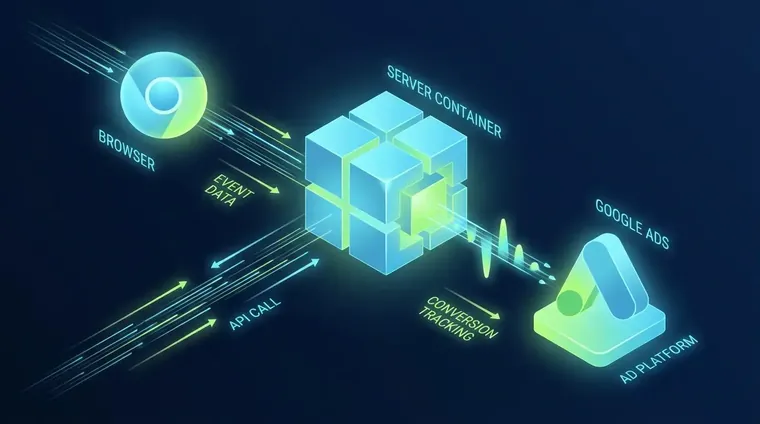
Server Side Conversion Tracking: Stop Feeding Bad Data to Smart Bidding
Search 'server side conversion tracking' in 2026 and the SERP is a wall of agency landing pages. Every one of them defines the technology by what it dodges. Ad blockers. ITP. Third-party cookies. That framing sells the wrong outcome. The real reason to run server side conversion tracking isn't the tracking coverage lift. It's the phantom ROAS problem: inflated conversion counts that teach Smart Bidding to optimize toward signals that don't correspond to real customers. We run into this constantly in our Google Ads Agency work. The setup steps are secondary. What matters first is understanding what bad data is already costing your campaigns before you touch a single tag.
What Is Phantom ROAS and Why Does It Corrupt Bidding?
Phantom ROAS occurs when duplicate or bot-generated conversion signals inflate reported returns, causing Smart Bidding to chase ghost conversions instead of real buyers.
Phantom ROAS means your reported conversion volume is higher than your real conversion volume. Smart Bidding reads your conversion history and prices bids from it. If 30% of your reported conversions are duplicate fires, bot clicks, or tag misfires, the algorithm trained on a dataset that never existed.
We see this most often in accounts that migrated from client-side to server side conversion tracking without turning off the client-side tag first. Google Ads has no built-in deduplication. Unlike Meta's Conversions API. Run a web tag and a server tag on the same conversion action at the same time without careful trigger logic and you will double-count. Every double-counted conversion is a bad training rep. Over 2–4 weeks, Smart Bidding recalibrates around a fiction.
The fix is not to rip out your existing setup overnight. Validate what's firing. Audit for ghost conversions using Google Ads Conversion Diagnostics. Phase the transition. Pause web tags only after server hits are confirmed. That validation step gets skipped in virtually every setup guide published about server side conversion tracking.
Google Ads has no native deduplication for server-side hits. Running web and server tags together without trigger guards guarantees double-counted conversions.
Meta's Conversions API uses an `event_id` parameter to deduplicate browser and server events automatically. Google Ads has no equivalent. Fire both a client-side conversion tag and a server-side conversion tag for the same user action and both hits get counted. That's the most common implementation hazard we've seen. Neither top-ranking guide on this topic mentions it.
When Is Server Side Conversion Tracking Actually Worth It?
Server side conversion tracking pays off on high-traffic accounts with Smart Bidding active. Low-spend or low-volume accounts often won't recover the infrastructure cost.
- Monthly spend above ~$5K A server container on a managed cloud host runs $30–$150/month depending on traffic. Below $5K in monthly ad spend, the marginal data recovery rarely moves ROAS enough to justify the overhead.
- Smart Bidding is active If you're running Target CPA or Target ROAS bidding strategies, conversion signal quality directly controls how the algorithm prices your auctions. Bad signals cost real money.
- High-intent, single-session conversions E-commerce checkout completions and lead form submissions in a single session are ideal. Multi-touch attribution across days or devices adds complexity that server-side alone doesn't solve.
- You have a developer (or a trusted implementation partner) Three distinct Enhanced Conversions implementation paths exist: automatic collection, manual HTML/CSS config, and full code configuration. The last two require someone who can read a network request.
- You do NOT have existing client-side tags to sunset Greenfield setups are cleanest. If you're migrating a legacy client-side setup, budget time for auditing existing conversion actions before touching the server container.

What Actually Happens to Smart Bidding After Migration?
Expect a 2–4 week Smart Bidding learning period after migration; performance may dip before it improves as the algorithm recalibrates on cleaner conversion signals.
This is the question no setup guide answers. When you shift conversion signal sources. Even if total volume stays flat. Smart Bidding treats the change as a data discontinuity. The algorithm enters a learning period. Depending on your conversion volume, that's 2–4 weeks of elevated CPA and reduced impression share while Google re-prices your bids against the new signal quality.
The practical implication: don't migrate in the 30 days before a major sales event. We learned this the hard way with an e-commerce account that ran the server migration two weeks before Black Friday. The learning period bled into peak season. Conversions recovered by week three, but the timing cost real revenue.
Dual-running web and server tags for a validation period. Typically 7–14 days. Lets you confirm server hit volume before sunsetting the client-side tag. During that window, use a secondary, non-bidding conversion action for server hits. That way Smart Bidding doesn't see a volume spike that distorts the baseline.
Stape's published case study on Paper Planes, a Finnish sustainability company, reported a 25% increase in measured Google Ads conversions and a 0.3-second page load improvement after an EU-hosted server-side setup. Those numbers look clean. What the case study doesn't show is the learning curve between go-live and steady state. That's where most implementations struggle.
A 30-minute tracking audit can identify phantom conversions and deduplication gaps before they corrupt your Smart Bidding further.
If you're running Google Ads and haven't audited your conversion setup in the last 90 days, phantom conversions are probably already in your bidding signal. Book a call. We'll pull the Conversion Diagnostics report live and show you exactly what's firing.
Enhanced Conversions: Core Requirement, Not Optional Add-On
Enhanced Conversions should be treated as a core component of server side conversion tracking. Without it, match rates and bidding quality degrade significantly.
Most guides treat Enhanced Conversions as a bonus step at the end of setup. That's backwards. Enhanced Conversions hash user-provided data. Email, name, address, phone. Via SHA-256 before sending it to Google. That's what closes the identity graph gap that makes server-side tracking accurate.
Without it, server-side hits are anonymous events. Google can attribute them to clicks if the GCLID is preserved in the server request, but match rates drop hard for users who don't click a fresh ad. With Enhanced Conversions, Google can match conversions to logged-in users across devices. That recovers attribution GCLID alone misses.
On the GDPR side: server-side firing without browser consent signals can still constitute unlawful processing depending on your jurisdiction. The server container doesn't automatically inherit the user's consent state from the browser. You need to pass `consent_state` parameters through the dataLayer and into the server container explicitly. Most implementation docs gloss over this. It's a real exposure if you're running ads into the EU.
Our Facebook Ads Agency work runs into the same consent-state problem with Meta's CAPI setup. The infrastructure is different. The compliance gap is identical.

Why Operator Experience Changes How We Read Tracking Data
Operators who've run real businesses read conversion data differently. They know bad signals cost money, not just dashboard accuracy.
Receipts Group's founder built and sold DeliveryLean, one of the first food-service businesses in Florida. That exit credential predates every marketing claim on this site. That background changes how I read conversion data. When you've owned a P&L, a 20% phantom ROAS inflation isn't a reporting error. It's a budget allocation problem. It's money that left the account chasing customers who were never there.
Most tracking guides are written by people who've never had skin in the conversion outcome. The framing stays technical. Containers, tags, hashing algorithms. The business cost stays invisible. Server side conversion tracking matters because every bad signal is a bid placed at the wrong price. Fix the signal, fix the allocation. That's the actual job.
For related reading on where tracking quality meets campaign structure, see our post on what an ecommerce PPC agency should actually do for you. The conversion architecture section covers similar ground from the campaign side rather than the tag side.
Client-Side vs. Server Side Conversion Tracking: The Real Trade-Offs
Server side conversion tracking gives cleaner bidding signals and better consent control, but costs more to maintain and requires deduplication logic that client-side doesn't need.
| Feature | Client-Side Tags | Server Side Tracking |
|---|---|---|
| Deduplication | Built into GTM trigger logic | Manual — no Google Ads native dedup |
| Smart Bidding signal quality | Degrades with ad blockers and ITP | More stable; GCLID preserved server-side |
| Consent compliance (EU) | Consent mode handles browser signals | Must explicitly pass consent_state through container |
| Infrastructure cost | None beyond GTM | $30–$150/month for server container hosting |
| Failure mode visibility | GTM Preview mode | Conversion Diagnostics + server logs required |
Frequently Asked Questions
Does server-side conversion tracking deduplicate events like Meta CAPI?
No. Google Ads has no native deduplication for server-side conversion hits. Unlike Meta's Conversions API, which uses an event_id parameter to prevent double-counting browser and server events, Google Ads will count both a web tag fire and a server tag fire as separate conversions. If you're running both simultaneously without careful trigger logic, you will double-count conversions and corrupt your Smart Bidding signals.
How long does Smart Bidding take to recover after a server-side migration?
Expect a 2–4 week learning period after changing your conversion signal source. During this window, Smart Bidding recalibrates its bidding model, and you may see elevated CPA or reduced impression share. We recommend dual-running web and server tags for 7–14 days before sunsetting client-side tags, and avoiding migrations in the 30 days before a major sales event.
Is server-side conversion tracking worth it for a low-spend account?
Probably not for accounts spending under $5K/month. A managed server container costs $30–$150/month, and the marginal data recovery from server-side tracking rarely moves ROAS enough at low spend volumes to justify that overhead. Server-side tracking pays off when Smart Bidding is active and conversion volume is high enough for the algorithm to act on improved signal quality.
Does server-side conversion tracking satisfy GDPR consent requirements?
Not automatically. The server container doesn't inherit browser consent state on its own. You must explicitly pass consent_state parameters through the dataLayer and into the server container. Firing server-side conversion events without passing consent signals can still constitute unlawful processing under GDPR, even though the hit originates from your server rather than the user's browser.
How do I validate server-side conversion tracking is working in Google Ads?
GTM Preview mode confirms tag fires within the container, but it's not sufficient to validate Google Ads attribution. Use Google Ads Conversion Diagnostics to confirm server hits are being attributed correctly. Also check for ghost conversions from bot traffic by comparing conversion volume against session quality metrics. Log-level auditing on your server container and spot-checking individual transaction IDs against your CRM are the most reliable failure-mode checks.
Related reading
Free guides on this, step by step:
Get a Conversion Tracking Audit Before Your Next Campaign
Bad conversion data doesn't just break your reports. It breaks your bids. If you're running Performance Max or any Smart Bidding strategy without validated server-side signals, the algorithm is learning from noise. Our Google Ads Agency team runs a Conversion Diagnostics audit first on every new account. The tracking layer determines everything that comes after it. Book a call and we'll show you exactly what's firing.